Auto-clipping in the media library
Turn one long video into ready-to-post vertical clips
Upload your video, review the suggested moments and adjust the crop and captions. Then create clips for Reels, TikTok or Shorts.
Start for free, no credit card.
- Hosted in Germany
- Built around the GDPR
- No credit card needed
Hosted in Germany. No credit card required.

Why long videos rarely become clips
Scrubbing through takes time
Combing an hour of footage for the right moments is easy to put off. Often the long version is all that ever gets posted.
Editing and formatting are manual
Find the segment, switch it to vertical, add captions: every clip means several steps across several tools.
Captions often get skipped
Plenty of Reels and Shorts play without sound. Without burned-in captions, part of the message gets lost.
How a video becomes a clip
Upload your video
Drop your long-form video into the media library. Impulio reads the audio and looks for segments that work as a standalone clip.
Review the suggestions
You get several segments suggested, each with a title and a short reason. You decide which ones become clips.
Adjust and create the clip
Check the segment, crop and captions before creating the clip. The rendered clip is saved as a separate media file; the source video stays unchanged.
From a source video to a reviewed clip
Keep your source video, suggested segments and clip creation in the media library. Suggestions still need your review. Creating a clip does not publish it: add it to a post and choose the publishing flow separately.
Common questions
What kind of videos can I upload?
Long-form videos such as recorded podcasts, interviews, or talks. From one of these, Impulio suggests several short segments that you can accept as clips one by one.
Are the captions burned in?
Yes. The captions are rendered straight into the picture so the clip stays clear with the sound off. They are part of the video, not a separate layer.
Does my original video stay intact?
Yes. The clip is saved as a new file in the media library. The long-form video you uploaded stays untouched.
Get several clips from your next long-form video
Upload it, accept a suggestion, and pick up the finished 9:16 clip with captions in your media library.
Record in OBS. Keep working in Impulio.
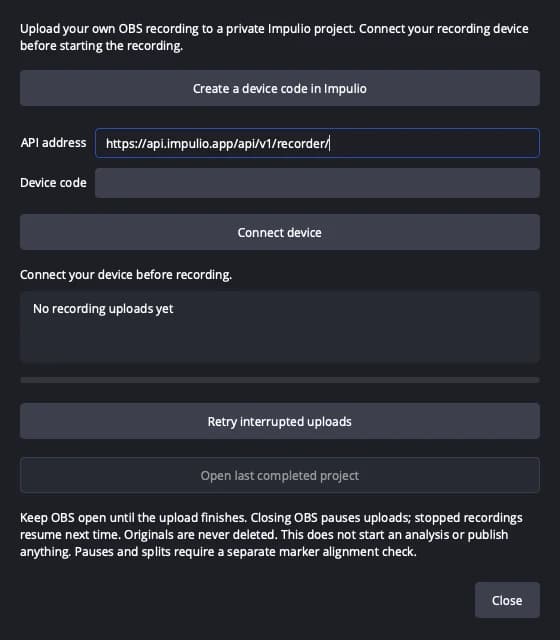
The native Impulio plugin sends your own local recording to a private project. Setup and upload stay inside OBS.
Preview: The plugin package for macOS on Apple Silicon and OBS 31.1.1 is not publicly available yet. You can already start with the file upload in Impulio.
- 1
Connect to your account once
Create a device code in Impulio and connect the plugin before recording.
- 2
Stream and record locally
Start your Twitch stream and recording yourself in OBS. After recording stops, the plugin transfers the file; keep OBS open for the upload.
- 3
Continue in your private project
Review the association and edit your moments in Impulio. Uploading starts no paid analysis and publishes nothing.
OBS Studio → Tools → Impulio